Documentation

Product documentation portal — overview, system roles, administration, and feature guides.

Atlassian Marketplace

Resource Management for Jira on the Atlassian Marketplace — install, try free, and see pricing and reviews.

Product

Resource Management for Jira

Transform resource planning from guesswork into precision — with a single solution that combines:

  • enterprise-grade organizational structure management (teams/RBS, scoped managers)
  • precise calendar-based capacity planning — plus self-service availability requests (holidays, partial days, exceptions) with Team Manager approval
  • synchronization between resource teams and projects through a structured resource-request workflow — including one-click Jira task creation for accepted requests
  • time reporting and timesheets powered by Jira worklogs — including reliable synchronization, optional worklog submission/approval, and overtime tracking
  • advanced analytics that compare demand, assigned allocations, capacity, and actuals across past and future periods — helping you optimize team capacity against project needs
  • vacation and time-off self-service that keeps calendars, capacity, and approvals aligned without email back-and-forth
  • invoice-ready exports (CSV/XLSX) for time-and-material billing, based on submitted or approved hours, with optional worklog details and effective rates

All in your familiar Jira or Jira for Service Management interface.

note

Your data is safe: the application stores your data in the fortified Atlassian Forge cloud, and only you (and Atlassian) can access it.
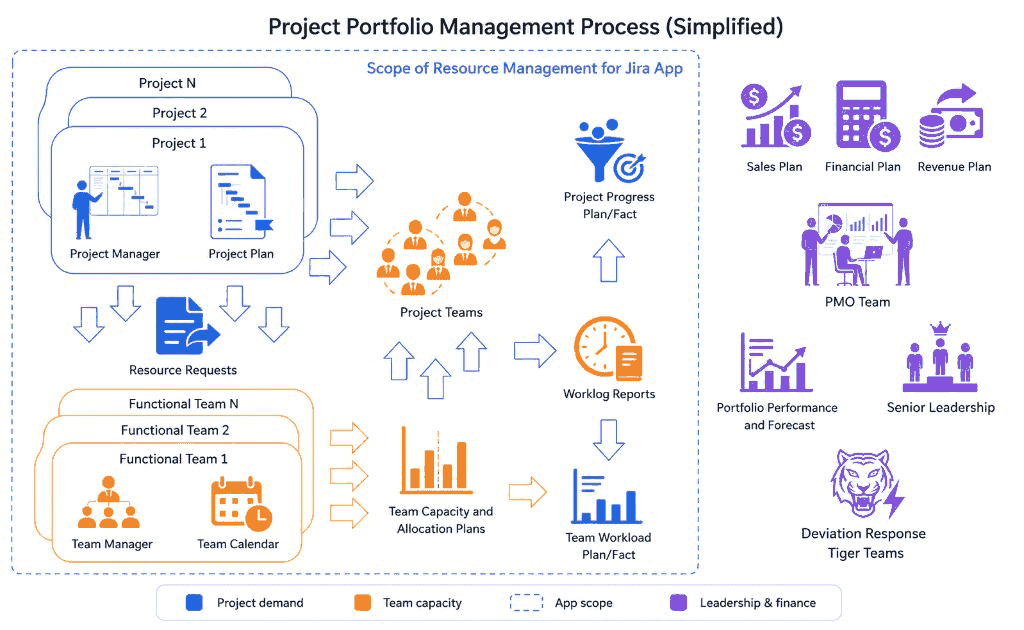
The Bigger Picture: How this fits in the context of the project portfolio management process

Most companies don’t run one project in isolation. They run many projects in parallel, competing for the time of the same expert teams (engineering, QA, design, operations, etc.). The bigger the company (and the more teams, projects, and stakeholders), the harder it becomes to coordinate this as “one organization”.

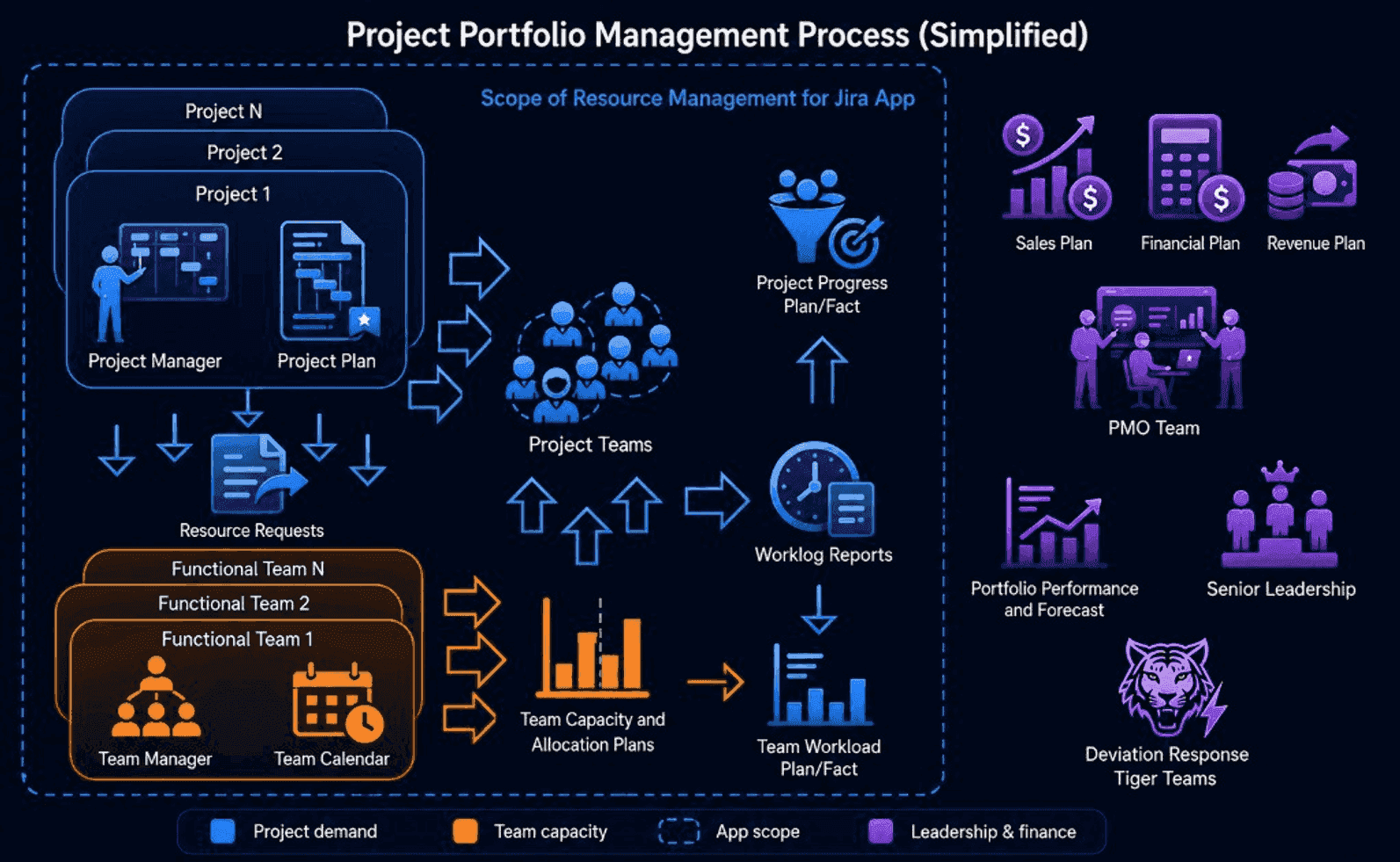
The diagram below shows a simplified project portfolio management process: projects and functional teams continuously exchange demand, capacity, and delivery signals — and these signals roll up into portfolio plans and reporting.

Project portfolio management process and the scope of Resource Management for Jira

Why this is difficult at scale

  • Portfolio planning is cross-functional: individual project plans roll up into portfolio-level plans (sales/revenue/financials), where Sales, Finance, PMO, and senior leadership all need consistent data.
  • Projects and teams form a many-to-many system: each project needs multiple specialist teams, and each team serves multiple projects. That means Team Managers constantly balance competing demands, while Project Managers struggle to staff a cross-functional project team fast enough to hit tight timelines.
  • Many tools optimize a single team: they improve within-team execution, but often leave the coordination layer (project ↔ teams) as manual work—spreadsheets, meetings, and ad-hoc negotiation.

What this product changes

Resource Management for Jira was built with portfolio-scale coordination in mind. It helps you manage the project ↔ team interaction that determines whether projects get staffed, stay on plan, and recover quickly when reality deviates. It’s designed to stay usable even across large portfolios (many projects, teams, and requests).

  • Plan and staff cross-team delivery: a structured, stateful resource request workflow connects Project Managers and Team Managers, with clear ownership, status, and fulfillment visibility.
  • Track plan vs actual with 1‑minute precision: baselines come from approved allocations and effective calendars; actuals come from Jira worklogs, enabling accurate variance signals.
  • Handle deviations and exceptions: see overloads early, adjust allocations, and keep an audit-friendly trail of decisions and approvals.

Who benefits (beyond PMs and Team Managers)

  • PMO / portfolio stakeholders: clearer rollups across many projects and teams, and earlier visibility into capacity risks.
  • HR / resource governance: enterprise-grade hierarchical org structure (teams/RBS) and scoped manager access.
  • Finance / client invoicing: reliable time reporting sourced from Jira worklogs, ready for downstream billing processes.
  • Team members: a fast, modern time-reporting flow for creating and editing Jira worklogs (day/week calendar UI with smart assistance).

Seamless Jira-native integration

The app runs inside Jira and is designed to use Jira system objects and worklogs as the operational source of truth, while adding the missing coordination and capacity-planning layer needed for portfolio-scale delivery.


Stateful resource request engine that connects PMs and teams

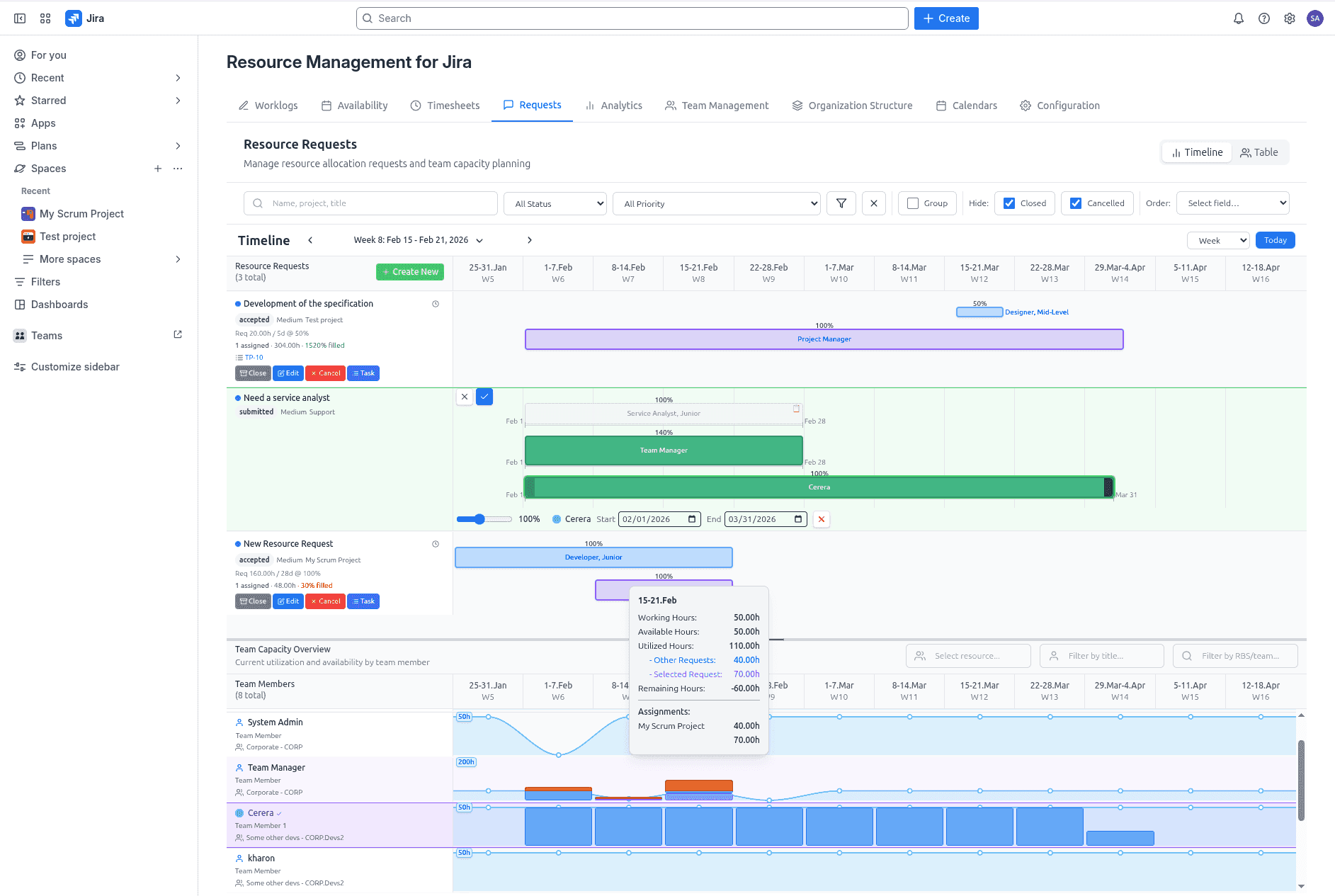
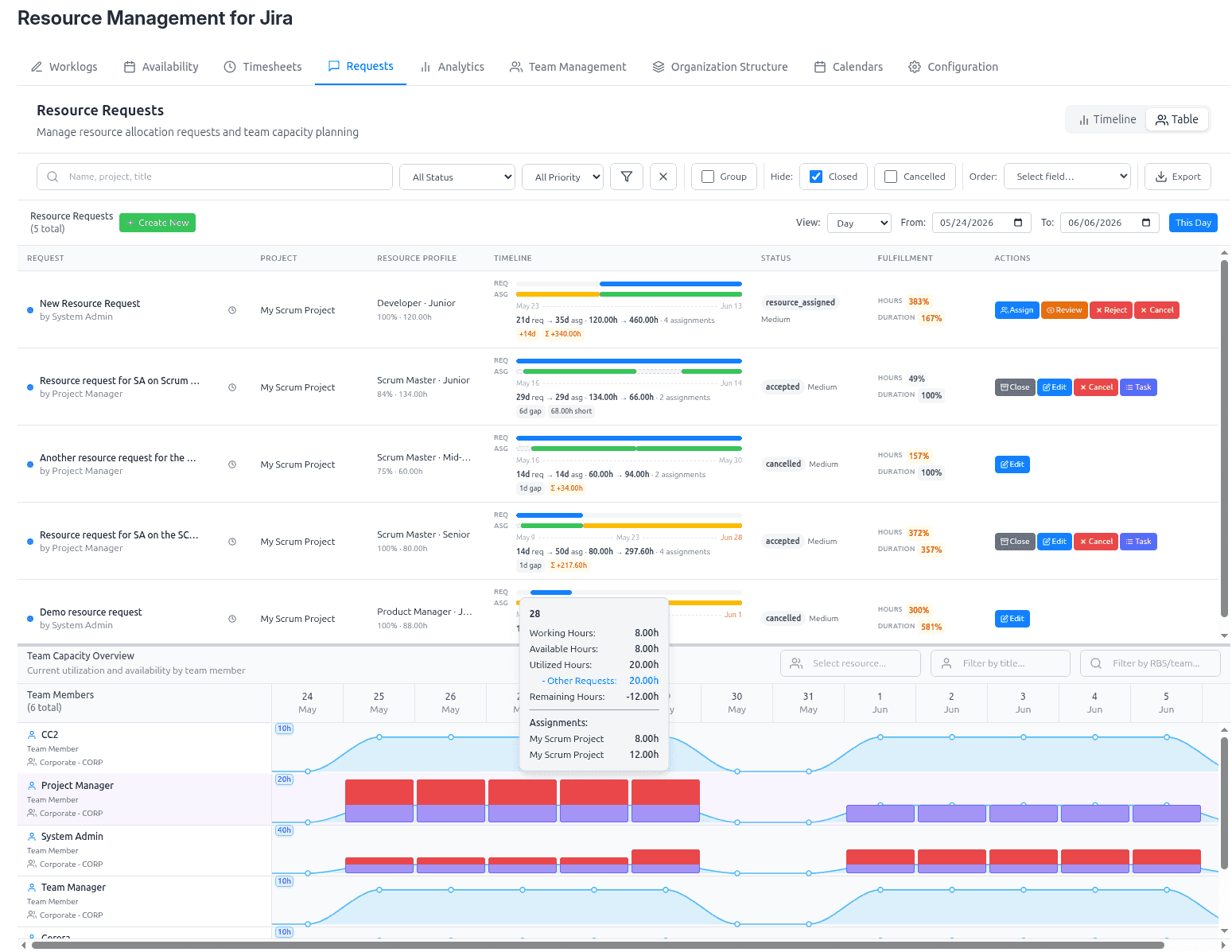
A complete request lifecycle, powered by a state-machine workflow, connects Project Managers and Team Managers. Plan requests interactively on a timeline, allocate partially (percent allocations), and get automatic summaries (requested vs allocated hours, fulfillment %). Resource load is computed continuously and overloads are flagged in real time.
  • Better planning decisions through visual context
  • Structured handoff from project demand → team capacity → resource allocation
  • Full visibility into each resource’s effective and remaining capacity for Team Managers
  • Clear visibility into fulfillment status and gaps for Project Managers
  • Less manual coordination and fewer “lost” requests
  • One-click Jira task creation for accepted requests (assignee + watchers kept in sync with the request)
  • Optional Jira notifications for key resource-request events (submitted, accepted, review, rejected, closed, cancelled)

Screenshot placeholder: Resource request workflow + timeline


Rich Jira worklog management

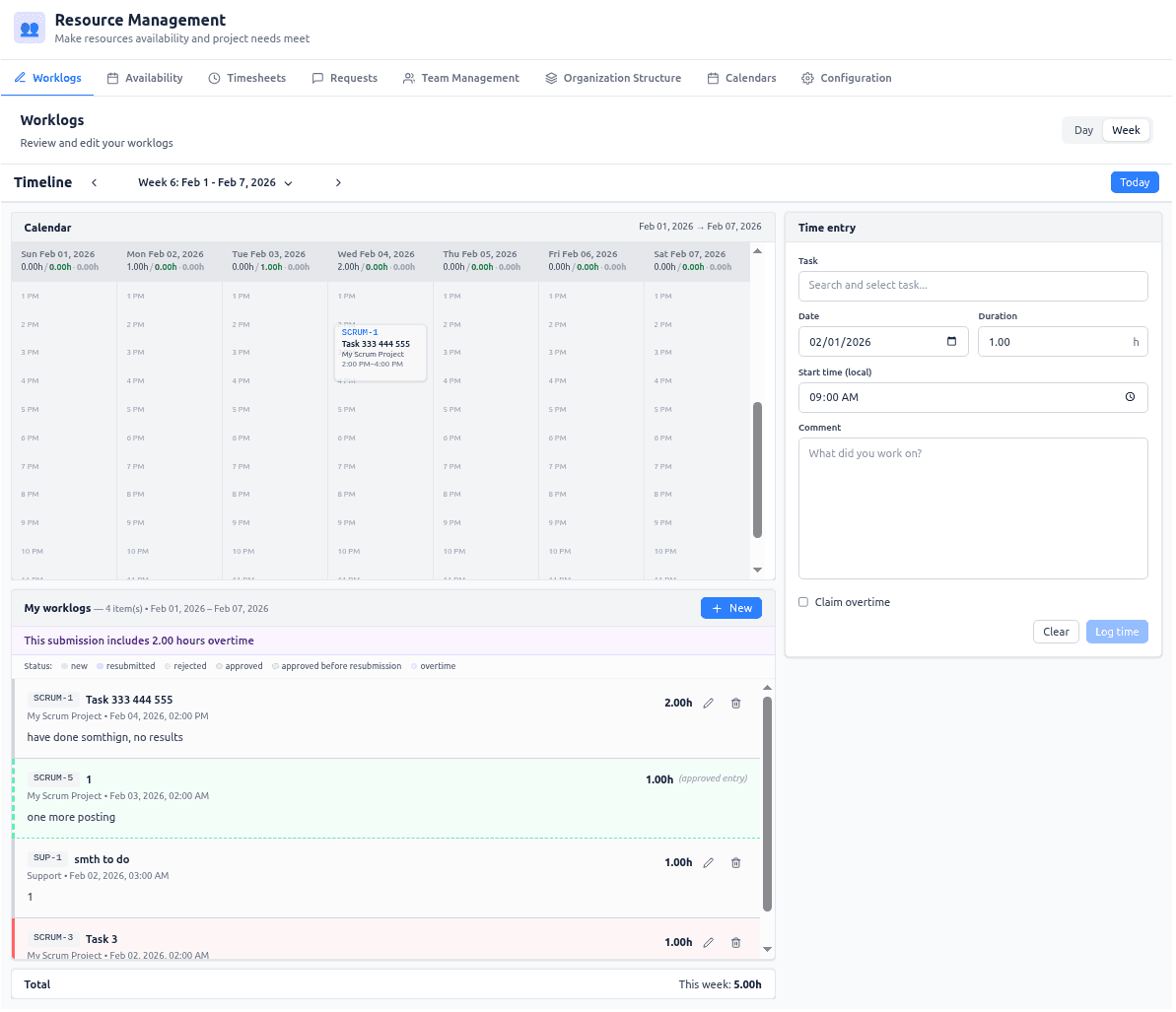
Jira worklog editing becomes a first‑class workflow: day/week calendar views, smart start‑time presetting, inline issue search, and fast update/create modes. When approvals are enabled, the same flow supports submission / resubmission and Project Manager approval or rejection — with separate overtime tracking. A reliable sync engine maintains a fast local mirror for timesheet aggregation, with user self-service “sync now” when needed.

  • Faster time entry with fewer errors
  • Interactive editing of Jira worklogs in a calendar view
  • Real-time visibility into total hours logged for the selected period
  • Optional Jira notifications for overtime claims and approval decisions

Screenshot placeholder: Worklog editing day/week views


Intelligent timesheets with baseline comparison

Timesheets become actionable by comparing actuals against smart baselines:

  • Team View: posted hours vs available working time from effective calendars
  • Project View: posted hours vs allocated hours from approved resource requests

Color-coded variance highlights discrepancies so you can spot utilization risks and under- or over-reporting at a glance.
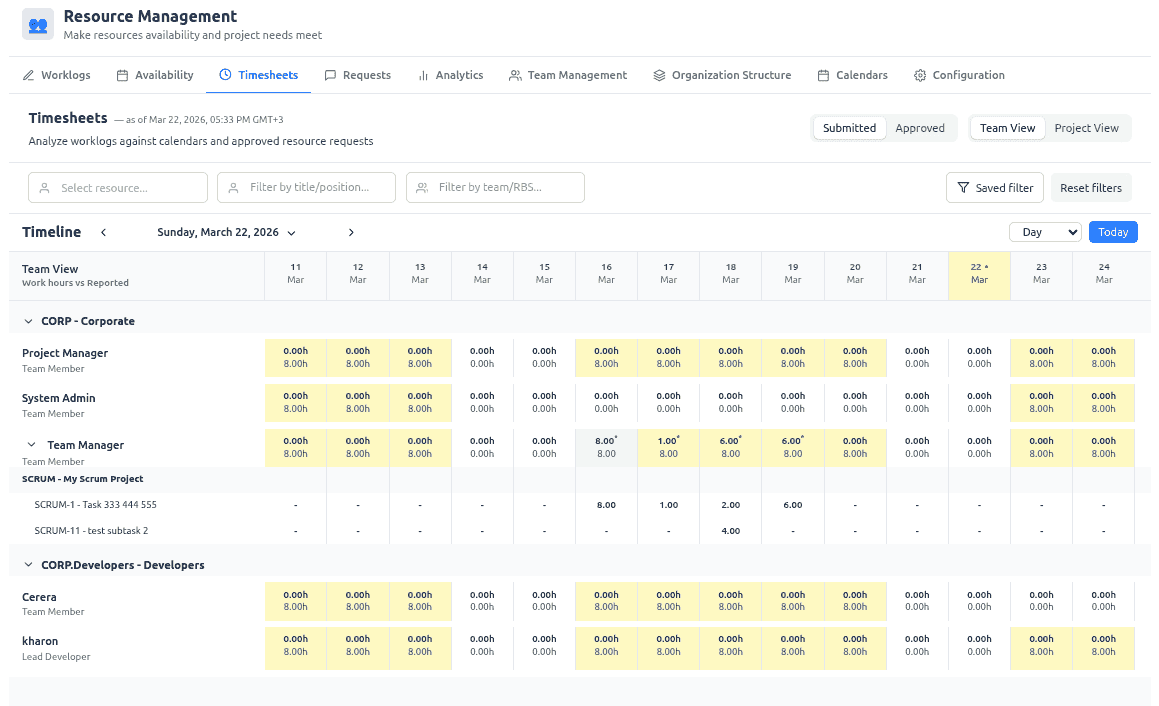
  • Immediate detection of over‑allocation and under‑utilization
  • Better compliance and audit readiness
  • Executive‑ready reporting
  • Worklog approvals and overtime signals (when enabled), directly in the timesheet context
  • Download invoice exports (CSV/XLSX) for a selected project and date range, using submitted or approved hours

Screenshot placeholder: Timesheets variance + baselines


Advanced resource analytics for smarter portfolio decisions

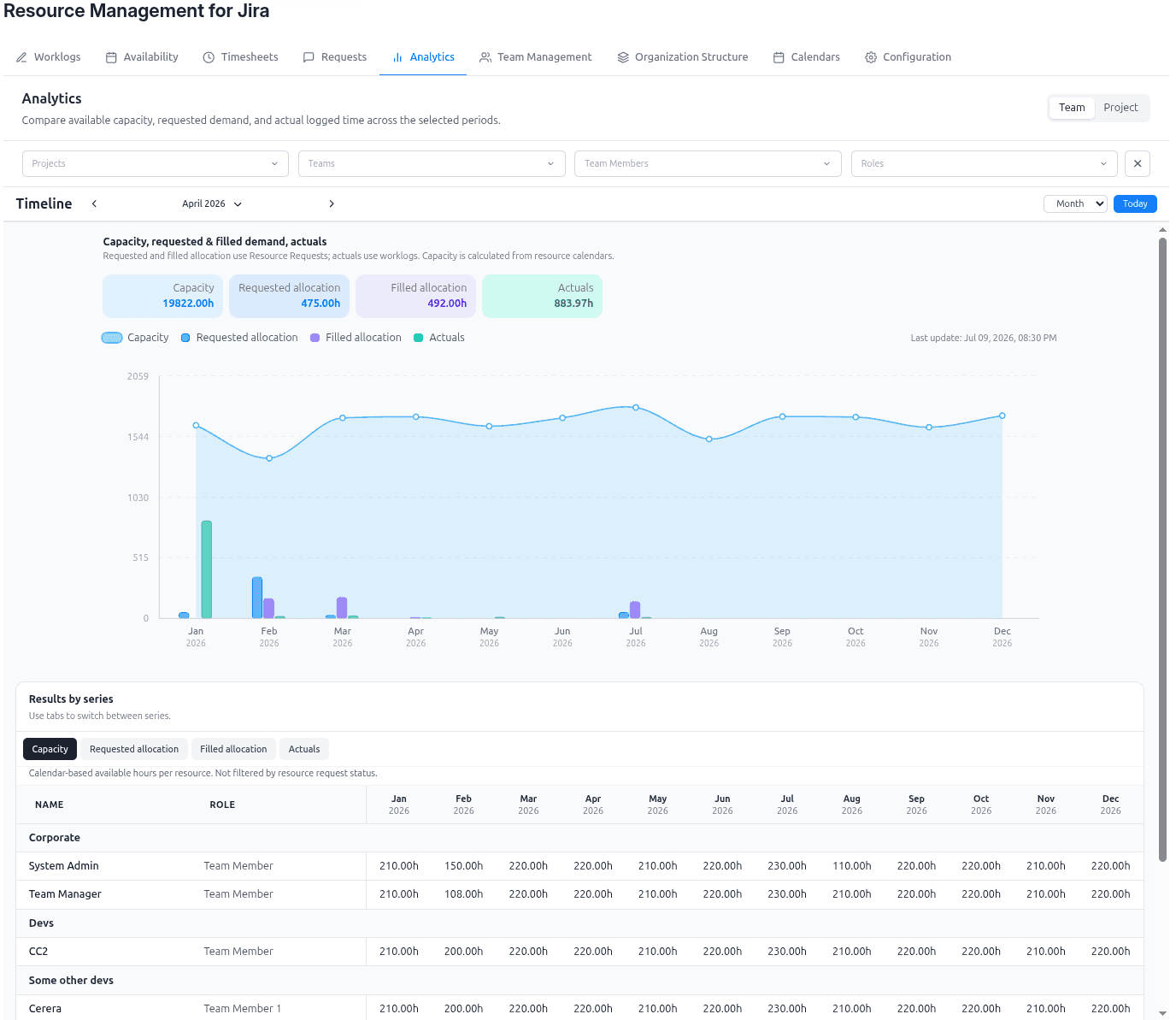
Planning data becomes much more valuable when you can see it as a decision-making system, not as isolated screens. The Analytics module gives PMOs, Teams, and Projects a forward-looking view of how project demand, assigned allocations, available capacity, and actual logged work evolve across the same timeline.

This makes it easier to answer the questions that matter most:

  • Are our teams likely to be overloaded in the upcoming periods?
  • Are we converting requested demand into assigned capacity quickly enough?
  • Are actuals tracking the original plan, or is delivery drifting?
  • Which teams, roles, or projects need corrective action before risks become visible to customers or leadership?

With one analytics workspace, you can compare:

  • Accumulated demand raised by projects
  • Filled allocations already assigned to the managed teams
  • Available capacity based on real calendars and working time
  • Actuals from Jira worklogs, so you can analyze past performance and current execution

The result is a practical planning cockpit for both retrospective and forward-looking analysis. You can review historical performance, detect recurring allocation gaps, and project the future resource situation for upcoming periods — helping you rebalance work earlier, improve forecast confidence, and align delivery commitments with realistic team capacity.

Why customers care:

  • Turn fragmented staffing signals into one clear demand-versus-capacity view
  • Spot overcommitment, underutilization, and fulfillment gaps before they turn into schedule risk
  • Improve staffing decisions across multiple projects competing for the same specialist teams
  • Give PMOs and team leads a common picture for planning reviews and prioritization
  • Strengthen delivery predictability with plan-versus-actual visibility in Jira-native workflows

Advanced analytics: compare demand, allocations, capacity, and actuals


Invoice-ready exports for faster, cleaner billing

For time-and-material delivery, billing quality depends on trustworthy source data and a fast path from recorded work to invoice preparation. Resource Management for Jira gives you invoice-ready exports directly from the operational flow, based on Jira worklogs and the same project/time filters your teams already use.

This helps organizations:

  • Turn approved or submitted time into billing-ready files without manual spreadsheet consolidation
  • Reduce disputes by grounding invoices in transparent, traceable worklog data
  • Speed up month-end and project billing cycles
  • Keep finance, delivery, and project teams aligned on the same numbers

The export flow is flexible enough for real service operations:

  • CSV/XLSX output for one selected project and date range
  • Optional worklog details for auditability and customer transparency
  • Optional effective rates for richer financial processing
  • Support for submitted vs approved hours and overtime when those controls are enabled

The result is not just a file export. It is a cleaner billing process with less manual effort, stronger traceability, and more confidence in the numbers that go to customers.


Vacation and time-off self-service that keeps plans realistic

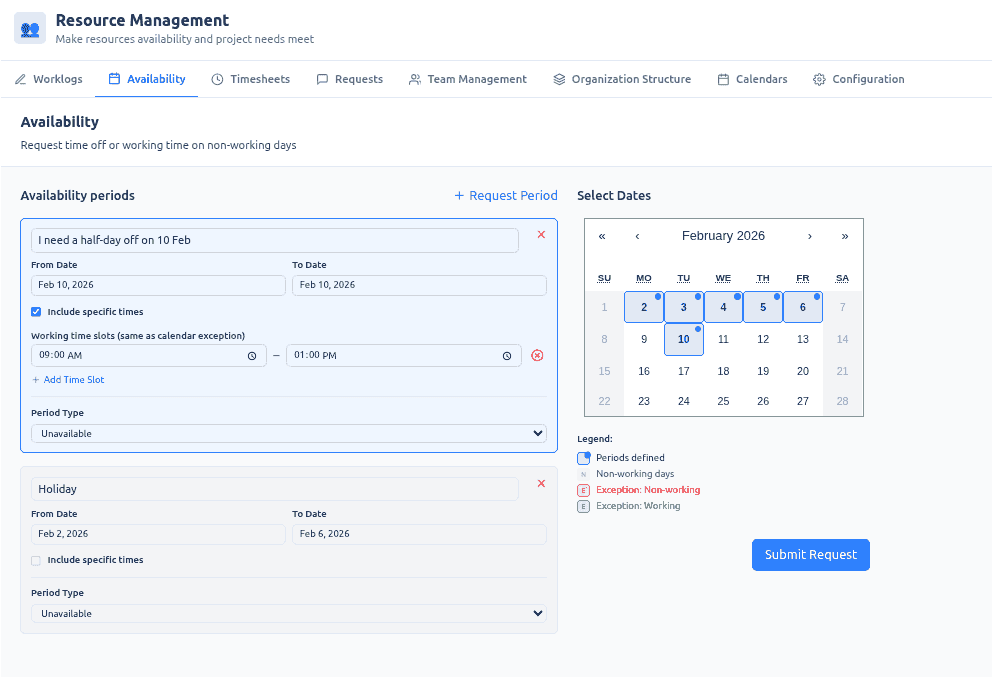
Capacity plans fail when availability changes stay trapped in emails, chats, or spreadsheets. Resource Management for Jira gives employees a self-service way to request vacation, time off, partial-day exceptions, and even working time on non-working days, while managers approve or reject those requests in a controlled workflow.

This creates value on both sides:

  • Employees get a clear, simple process for requesting availability changes without chasing administrators
  • Team Managers review and approve requests in context, with visibility into the real impact on planning
  • PMO and delivery leads can trust that capacity, allocations, and downstream reporting reflect approved reality rather than outdated assumptions

Because approved availability updates the planning model, the benefit goes far beyond HR convenience:

  • More reliable capacity calculations for upcoming periods
  • Fewer surprises caused by unrecorded leave or schedule exceptions
  • Better coordination between staffing decisions and real team availability
  • Cleaner plan-versus-actual analysis in requests, timesheets, and analytics

In short, it turns availability management into a practical self-service workflow that protects delivery plans from drifting away from reality.

Screenshot placeholder: Availability self-service


Accurate capacity planning with multi‑calendar intelligence

Traditional tools assume uniform working hours and ignore real-world calendars (part‑time schedules, holidays, sabbaticals, role changes). Our multi‑calendar engine calculates true capacity using effective periods, exceptions, and availability windows, for various locations — so plans stay realistic.
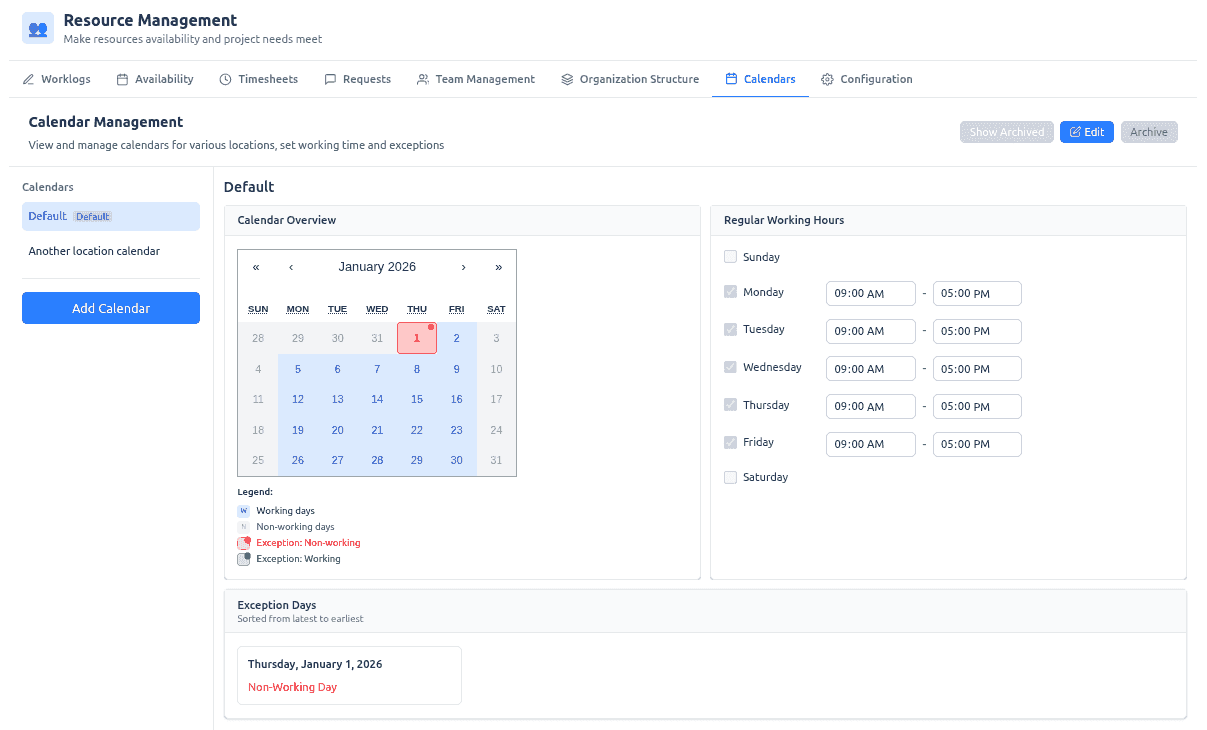
  • Fewer scheduling conflicts caused by bad capacity assumptions
  • Accurate baselines for utilization and timesheets
  • Better forecasting across day/week/month/quarter

Screenshot placeholder: Multi‑calendar capacity planning


Enterprise organizational structure (teams, RBS, scoped managers)

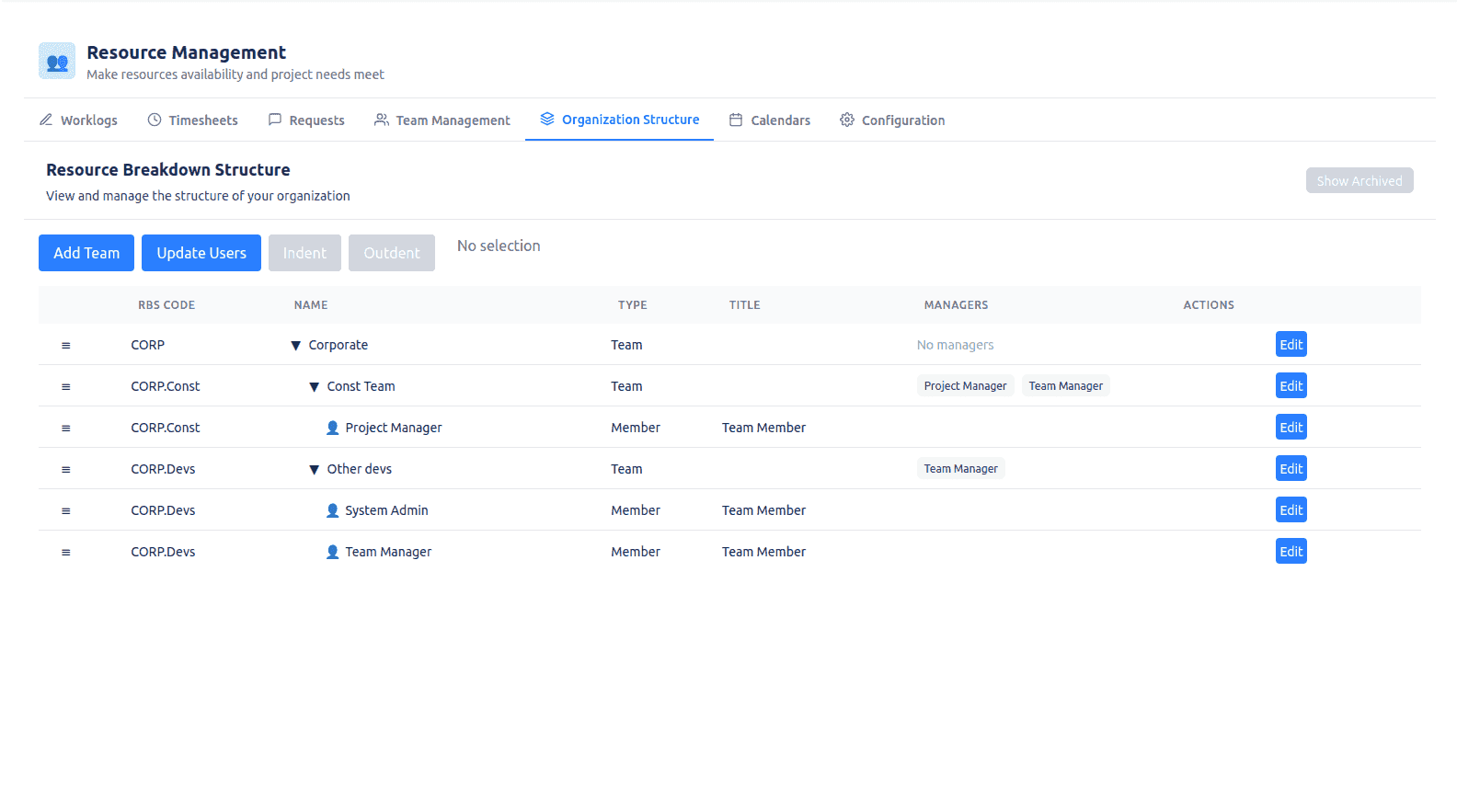
Scale resource management across large organizations with a hierarchical team structure (RBS codes) and scoped Team Manager access. Managers see and control only their teams, while maintaining a clean separation between system users and assignable resources.

  • Clear accountability and delegation at scale
  • Fast reporting and filtering via RBS structure
  • Reorganization is as simple as drag-and-drop
  • Team managers’ permissions are applied automatically

Screenshot placeholder: Organizational structure + team management


Team Manager control center: calendars, availability, and effective rates

Once your org structure is in place, Team Managers need practical tools to keep planning data accurate for day-to-day operations — without giving them access to the entire organization.

In the Team Management view, Team Managers work only with members of their managed teams and can maintain the inputs that drive capacity, timesheets baselines, and invoicing:
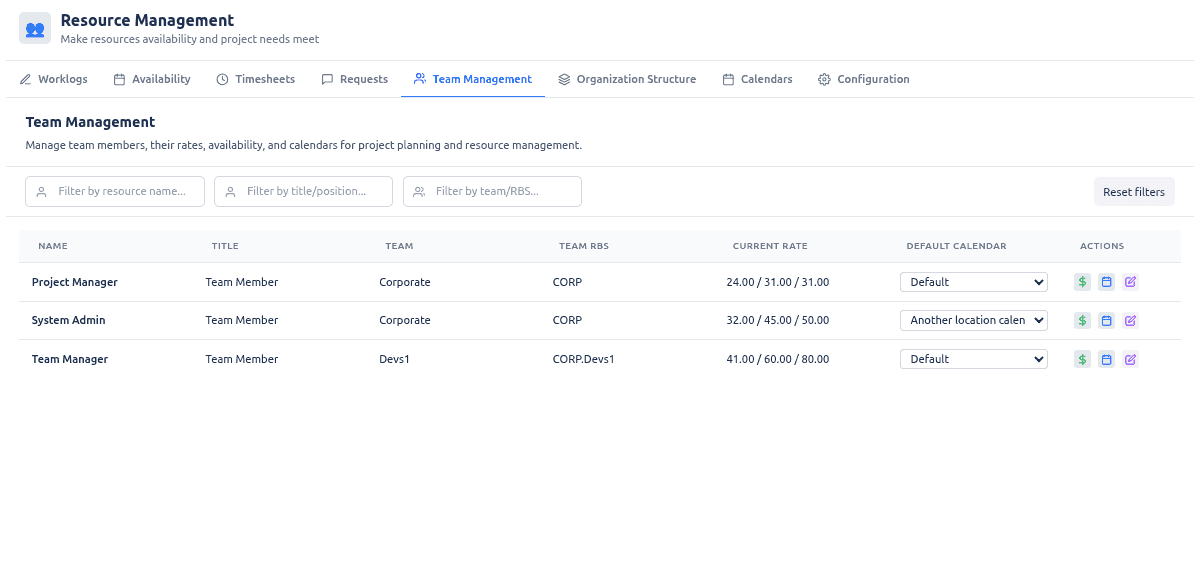
  • Default working calendars per person (working pattern + holidays)
  • Calendar overrides for specific date ranges (e.g. business trips, temporary location/schedule changes)
  • Availability periods and approvals: team members can request holidays, partial-day changes, or exceptions; Team Managers approve/reject to keep capacity realistic
  • Effective rate periods (standard / overtime / weekend) used for cost calculations and invoice exports

This ensures that allocations and baselines remain trustworthy as people’s schedules and rates change over time.

Screenshot placeholder: Team Manager team management and approvals screen


Advanced filtering & search for large portfolios

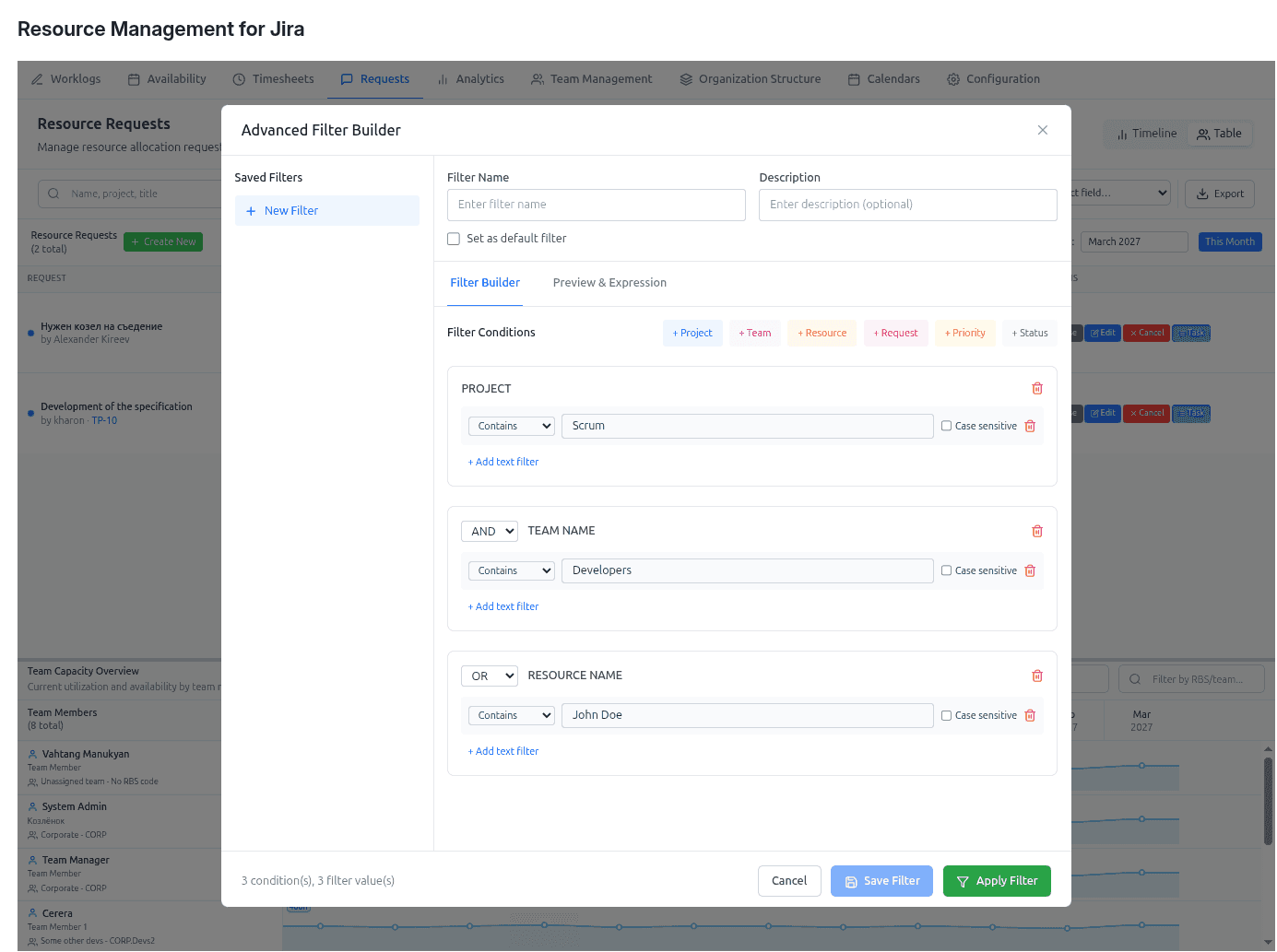
Navigate confidently across large datasets with a powerful filter builder that supports AND/OR logic, pattern matching (contains/starts/ends/exact/regex), saved filters, and real-time search across teams, projects, resources, and requests.

  • Find what you need in seconds (even with thousands of requests)
  • Reusable saved filters for reporting and operations
  • Faster day‑to‑day portfolio triage

Screenshot placeholder: Filtering builder + saved filters


Granular, scoped access control for real enterprises

A role model built for scale: Instance Admin, Resource Management for Jira App Admin, Team Manager (scoped), Project Manager (scoped), and Viewer. Multi‑role users can switch perspectives, and backend‑enforced scopes ensure the right people see the right data.

  • Secure by design, with scoped visibility
  • Supports delegation without chaos
  • Context‑aware actions by role and request

Ready to see it in action?

Contact us to schedule a demo: Contact form