Resource Management for Jira
Product functionalities overview
This page is a user and admin overview of what Resource Management for Jira does and how the main parts fit together. Use the links at the bottom to jump into the detailed guides.
Transform resource planning from guesswork into precision — with a single solution that combines:
- enterprise-grade organizational structure management (teams/RBS, scoped managers)
- precise calendar-based capacity planning — plus self-service availability requests (holidays, partial days, exceptions) with Team Manager approval
- synchronization between resource teams and projects through a structured resource-request workflow — including one-click Jira task creation for accepted requests
- time reporting and timesheets powered by Jira worklogs — including reliable synchronization, optional worklog submission/approval, and overtime tracking
- advanced analytics that compare demand, assigned allocations, capacity, and actuals across past and future periods
- invoice-ready exports (CSV/XLSX) for time-and-material billing, based on submitted or approved hours
All in your familiar Jira or Jira Service Management interface.
Your data is safe: the application stores your data in the fortified Atlassian Forge cloud, and only you (and Atlassian) can access it.
Where this fits in a portfolio process (the bigger picture)
Most companies run many projects in parallel, competing for the time of the same expert teams. Resource Management for Jira focuses on the coordination layer where projects ↔ functional teams meet.
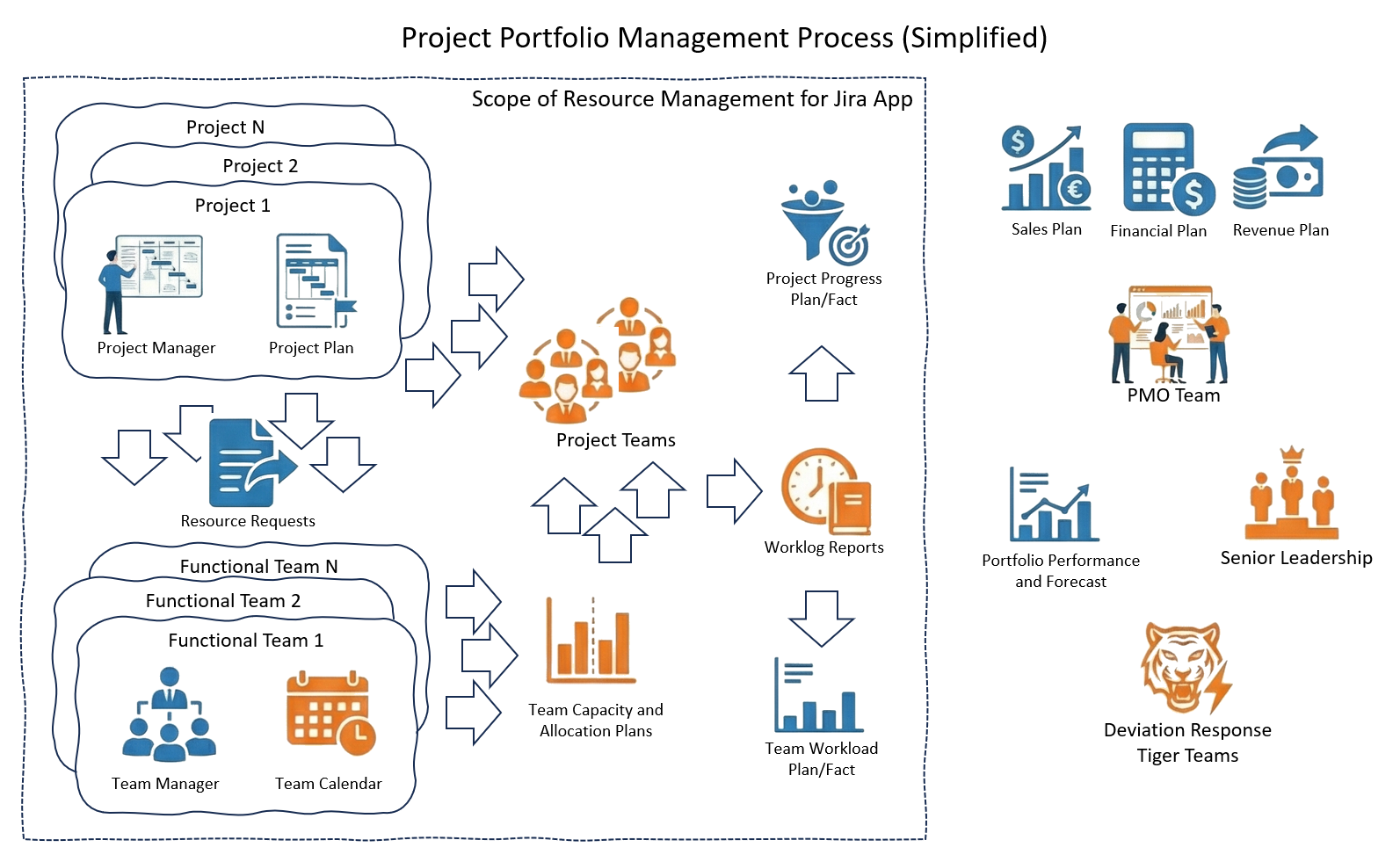
In practice, this means helping you:
- staff cross-functional project teams via a structured request workflow
- keep plans realistic using effective calendars + individual availability
- track plan vs actual with 1‑minute precision via Jira worklogs and baselines
- respond faster to change with clear ownership, approvals, and optional notifications
Who uses the system (typical roles)
- Team members: enter and manage Jira worklogs in a fast day/week calendar flow.
- Team Managers: keep team data up to date (calendars, availability, rates) and balance demand across competing projects.
- Project Managers: request resources, track fulfillment, compare allocated vs logged time, and approve/reject worklogs when approvals are enabled.
- HR / resource governance: maintain the organizational team structure (teams/RBS) as the company evolves (new teams, reorganizations, reporting structure).
- Admins (Instance Admin / App Admin): configure the application, roles, catalogs, and (optionally) notification settings; typically support HR/management operations with governance and access.
Main functional areas
Organization structure and scoped access
Manage a hierarchical team structure (RBS codes) and keep access scoped so managers work with the right part of the org.
- Hierarchical teams with RBS-style structure for reporting and navigation
- Scoped Team Manager and Project Manager visibility (enterprise-ready separation of responsibilities)
See: Organization structure, System roles
Team Management (Team Manager control center)
Team Managers can maintain the “source data” that drives planning, baselines, and invoicing — for members of their managed teams:
- Default calendars per person
- Calendar overrides for date ranges (effective periods)
- Availability self-service (including self-service requests and Team Manager approval/rejection)
- Effective rate periods (standard / overtime / weekend) used for costing and invoice exports
See: Team Management, Calendar management
Resource Requests (projects ↔ teams)
Project Managers request resources; Team Managers respond with feasible assignments. The workflow makes status and ownership explicit and reduces spreadsheet coordination.
- Timeline-based planning with request lifecycle and fulfillment visibility
- Capacity-aware assignment (partial allocations supported)
- One-click Jira task creation for accepted requests (helps time submission and follow-up)
- Optional Jira notifications for action-required request events (when enabled)
See: Resource Requests
Worklogs (time reporting)
Users manage Jira worklogs with a first-class UI designed for speed and accuracy.
- Day/week calendar entry and editing flow
- Reliable worklog synchronization, with self-service “sync now” when needed
- Optional submission/resubmission flow and overtime claim tracking (when enabled)
See: Worklogs
Availability self-service
Users can request time off (unavailable) or working time on non-working days (available exception) from the Availability self-service tab. Requests are approved or rejected by their line manager from Team Management → Manage Availability. Only approved periods affect capacity and timesheet baseline. The Availability self-service tab can be enabled or disabled in admin settings.
See: Availability self-service
Timesheets (plan vs actual)
Timesheets turn raw worklogs into actionable visibility by comparing actuals to the right baseline:
- Team view: logged vs available working time (effective calendar + approved availability)
- Project view: logged vs allocated time (from accepted resource requests)
- Optional worklog approval/rejection by Project Managers (when enabled)
See: Timesheets
Advanced resource analytics
The Analytics tab gives PMOs, Team Managers, and Project Managers a forward-looking way to compare:
- project demand from resource requests
- filled allocations already assigned to people
- available capacity based on real calendars and availability
- actuals from Jira worklogs
Use it to analyze past performance, detect overload and fulfillment gaps earlier, and project future resource pressure before it affects delivery.
See: Advanced resource analytics
Notifications (optional)
When enabled, Jira notifications can be sent for action-required events across:
- worklogs (overtime claimed, approved, rejected)
- resource requests (submitted/accepted/review/rejected/closed/cancelled)
- availability requests (created/approved/rejected)
See: Administration and configuration
Invoice exports (Timesheets → Project view)
For time-and-material billing, Project Timesheets can export invoice-ready data:
- CSV/XLSX export for one project and a selected date range
- Export submitted or approved hours
- Optionally include effective rates and detailed worklog rows
See: Timesheets, Invoice generator
Next steps
- Start with: Resource Requests
- For team setup and governance: Organization structure and Team Management
- For reporting and analysis: Advanced resource analytics, Timesheets, Worklogs, and Availability self-service
- For configuration: Administration and configuration